A simple thermometer chart using VB.NET 2.0/ASP.NET 2.0
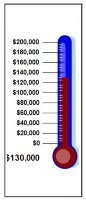
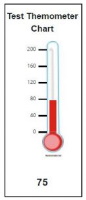
jThermometer is a class for creating thermometer charts of the type used generally to show progress toward a fund raising goal. It arose out of my involvement in a charity walkathon. The organizer wanted to have a thermometer-type chart on a the walkathon's home page to indicate progress toward fund raising goals. I was unable to find anything free that seemed appropriate for the site so I decided to create my own and share it on Code Project.
If you are simply looking for a thermometer chart to include on your web site or in a brochure or flyer and are not interested in the behind-the-scenes nuts and bolts of creating images with ASP.NET, then you might find this Thermometer Chart Tool useful.
Otherwise, here's how the Thermometer chart is created:
The chart uses GDI+ to compose an image and stream it out to the browser. Using the code
For the purposes of portability, I've separated the chart into two parts.
jThermometer is a class that creates a bitmap using GDI+ and streams it out to the current request as a GIF image.
Thermometer.aspx is a web page that accepts various parameters controlling the appearance of the Thermometer chart and that can be referenced by an <IMG> tag on another web page.
Thermometer.aspx uses these querystring values:
Further work
At present, the thermometer does not scale. I'd like to have it automatically scale based on user-provided dimensions. There are also a lot of appearence-related aspects that should be controlable via properties such as text color, indicator color and the color of the mercury.
Source Code
<%@ Page Language="VB" AutoEventWireup="false" CodeFile="ilc.aspx.vb" Inherits="ilc" %> <%@ Import namespace="Microsoft.VisualBasic" %> <%@ Import namespace="System.Drawing" %> <%@ Import namespace="System.Drawing.Imaging" %> <%@ Import namespace="System.Web" %> <!DOCTYPE html PUBLIC "-//W3C//DTD XHTML 1.0 Transitional//EN" "http://www.w3.org/TR/xhtml1/DTD/xhtml1-transitional.dtd"> <script runat="server"> '---Page accepts these querystring values: ' MIN: Value displayed at bottom of thermometer. ' MAX: Value displayed at top of thermometer ' IV: Value indicated on the thermometer. ' T: Title displayed at top of the thermometer ' VT: Type of values (1=currency, 2=decimal, 3=integer) Protected Sub Page_Load(ByVal sender As Object, ByVal e As System.EventArgs) Handles Me.Load Dim dMinValue As Decimal = 0 : If IsNumeric(Request.QueryString("MIN")) Then dMinValue = Request.QueryString("MIN") Dim dMaxValue As Decimal = 100 : If IsNumeric(Request.QueryString("MAX")) Then dMaxValue = Request.QueryString("MAX") Dim dIndicatedValue As Decimal = 50 : If IsNumeric(Request.QueryString("IV")) Then dIndicatedValue = Request.QueryString("IV") Dim sTitle As String = "Thermometer Chart" : If IsNumeric(Request.QueryString("T")) Then sTitle = Request.QueryString("T") Dim iValueType As JThermometer.ValueType = JThermometer.ValueType.Integer : If IsNumeric(Request.QueryString("VT")) Then iValueType = Request.QueryString("VT") Dim oThermometer As New JThermometer( _ dMinValue:=dMinValue, _ dMaxValue:=dMaxValue, _ dIndicatedValue:=dIndicatedValue, _ sTitle:=sTitle, _ iValueType:=iValueType) End Sub Public Class JThermometer '---These contants govern placement of the chart components on the target image. ' To change the layout of the chart, the constant values will need to be updated appropriately. Private Const MARGIN_TOP As Integer = 20 '---Amount of space between top of image and top of title text Private Const MARGIN_BOTTOM As Integer = 20 '---Amount of space between the bottom of the thermometer and the ' bottom of the image. Private Const MARGIN_LEFT As Integer = 20 '---Left position of the actual value Private Const TITLE_BOTTOMMARGIN = 55 '---Amount of space between top of title text and top of thermometer Private Const OUTERBAR_TOP As Integer = _ MARGIN_TOP + TITLE_BOTTOMMARGIN '---Amount of space between top of image and top of thermometer '---Bounds of elipse for curve at top of thermometer. Private Const OUTERBAR_WIDTH As Integer = 30 Private Const OUTERBAR_ARCHEIGHT As Integer = 30 '---Bounds of elipse for thermometer bulb Private Const OUTERBULB_WIDTH As Integer = 60 Private Const OUTERBULB_HEIGHT As Integer = 50 '---Bounds of elipse for curve at top of mercury Private Const INNERBAR_WIDTH = 18 Private Const INNERBAR_ARCHEIGHT As Integer = 30 Private Const INNERBAR_TOPMARGIN = 10 '---Amount of space between top of mercury and top of thermometer Private Const INNERBAR_BULBMARGIN = 10 '---Amount of space between thermometer bulb and mercury bulb. '---Bounds of elipse for mercury bulb Private Const INNERBULB_WIDTH As Integer = 40 Private Const INNERBULB_HEIGHT As Integer = 35 Private Const AXIS_MARGIN As Integer = 0 '---Distance of the axis indicators from the thermometer Private Const AXIS_IN1_WIDTH As Integer = 35 '---Width of the primary indicator Private Const AXIS_IN2_WIDTH As Integer = 20 '---Width of the secondary indicator Private TitleColor As Color = Color.Gray '---Color of the title text Private ActualValueColor As Color = Color.Gray '---Color of the actual value text Private IndicatedValueColor As Color = Color.Gray '---Color of the indicated value text Private miThermoCenter As Integer = 190 '---X position of the center of the thermometer within the image Private miWidth As Integer = 240 '---Width of the image Private miHeight As Integer = 400 '---Height of the image Private miOuterbar_Height As Integer = _ miHeight - (MARGIN_TOP + TITLE_BOTTOMMARGIN + OUTERBULB_HEIGHT) '---Height of the thermometer Private miInnerbar_Height As Integer = _ miOuterbar_Height - (INNERBAR_BULBMARGIN + (INNERBAR_ARCHEIGHT / 2)) '---Maximum height of the mercury '---The ValueType enum affects the formatting of value text (IE: whether decimal places and the currency sign are displayed. Public Enum ValueType As Integer [Currency] = 1 [Decimal] = 2 [Integer] = 3 End Enum ''' <summary> ''' Outputs a thermometer image to the response stream ''' </summary> ''' <param name="dMinValue">Min value displayed on the thermometer</param> ''' <param name="dMaxValue">Max value displayed on the thermometer</param> ''' <param name="dIndicatedValue">Indicated value of the thermometer.</param> ''' <param name="sTitle">Title displayed at the top of the thermometer</param> ''' <param name="iValueType">Value type (controls how numbers are formatted. See above)</param> ''' <remarks></remarks> Public Sub New( _ ByVal dMinValue As Decimal, _ ByVal dMaxValue As Decimal, _ ByVal dIndicatedValue As Decimal, _ ByVal sTitle As String, _ ByVal iValueType As ValueType) ShowThermometer(dMinValue, dMaxValue, dIndicatedValue, sTitle, iValueType) End Sub ''' <summary> ''' Displays the thermometer ''' </summary> ''' <param name="dMin">Min value to display on thermometerMax value to display on thermometerIndicated value to display on thermometerTitle to display at top of chartType of value to be displayed dMax Then dAdjValue = dMax Else dAdjValue = dValue - dMin End If Dim dPercent As Decimal = dAdjValue / (dMax - dMin) '---Create new image for composite Dim oImage As Bitmap = New Bitmap(miWidth, miHeight, PixelFormat.Format24bppRgb) '---Paste in the parts Dim oG As Graphics = Graphics.FromImage(oImage) '---Initialize graphic oG.FillRectangle(New SolidBrush(Color.White), New Rectangle(0, 0, miWidth, miHeight)) '---Draw thermometer DrawThermometer(oG) DrawMercury(oG, dPercent) DrawTitle(oG, sTitle) ShowAxisValues(oG, dMin, dMax, 10, 3, iType) DrawActualValue(oG, dValue, iType) HttpContext.Current.Response.ContentType = "image/Gif" oImage.Save(HttpContext.Current.Response.OutputStream, ImageFormat.Gif) oG.Dispose() oImage.Dispose() End Sub ''' <summary> ''' Draws the thermometer (border without interior mercury) ''' </summary> ''' <param name="oGraphic">Graphic on which to do the drawing</param> ''' <remarks></remarks> Private Sub DrawThermometer( _ ByRef oGraphic As Graphics) Dim iCenterX As Integer = miThermoCenter Dim iTopY As Integer = OUTERBAR_TOP Dim iBottomY As Integer = miHeight - MARGIN_BOTTOM Dim iOuterX_Left As Integer = iCenterX - (OUTERBAR_WIDTH / 2) Dim iOuterX_Right As Integer = iCenterX + (OUTERBAR_WIDTH / 2) Dim iOuterYArc_Top As Integer = iTopY Dim iOuterYArc_Bottom As Integer = iTopY + (OUTERBAR_ARCHEIGHT / 2) '---Draw top arc oGraphic.DrawArc(New Pen(Color.Black), iOuterX_Left, iTopY, OUTERBAR_WIDTH, OUTERBAR_ARCHEIGHT, 180, 180) '---Draw lines on each side oGraphic.DrawLine(New Pen(Color.Black), iOuterX_Left, iOuterYArc_Bottom, iOuterX_Left, (iOuterYArc_Bottom + (miOuterbar_Height - OUTERBAR_ARCHEIGHT))) oGraphic.DrawLine(New Pen(Color.Black), iOuterX_Right, iOuterYArc_Bottom, iOuterX_Right, (iOuterYArc_Bottom + (miOuterbar_Height - OUTERBAR_ARCHEIGHT))) '---Draw bulb at bottom Dim iBulb_Left As Integer = iCenterX - OUTERBULB_WIDTH / 2 Dim iBulb_Top As Integer = iOuterYArc_Bottom + (miOuterbar_Height - OUTERBAR_ARCHEIGHT) - 2 oGraphic.DrawArc( _ New Pen(Color.Black), _ iBulb_Left, _ iBulb_Top, _ OUTERBULB_WIDTH, _ OUTERBULB_HEIGHT, _ 304, _ 292) End Sub ''' <summary> ''' Draws the mercury indicator inside the thermometer. ''' </summary> ''' <param name="oGraphic">Graphic on which to do the drawing</param> ''' <param name="dFillPercent">Percent of the thermometer that is filled (0.0-1.0)</param> ''' <remarks></remarks> Private Sub DrawMercury( _ ByRef oGraphic As Graphics, _ ByRef dFillPercent As Decimal) Dim iFillTop As Integer = miInnerbar_Height - (miInnerbar_Height * dFillPercent) + OUTERBAR_TOP + INNERBAR_TOPMARGIN Dim iFillHeight As Integer = (miInnerbar_Height * dFillPercent) Dim iCenterX As Integer = miThermoCenter Dim iTopY As Integer = OUTERBAR_TOP + INNERBAR_TOPMARGIN Dim iBottomY As Integer = miHeight - MARGIN_BOTTOM Dim iInnerX_Left As Integer = iCenterX - (INNERBAR_WIDTH / 2) Dim iInnerX_Right As Integer = iCenterX + (INNERBAR_WIDTH / 2) Dim iInnerYArc_Top As Integer = iFillTop Dim iInnerYArc_Bottom As Integer = iFillTop + (INNERBAR_ARCHEIGHT / 2) '---For bulb at bottom Dim iBulb_Left As Integer = iCenterX - INNERBULB_WIDTH / 2 Dim iBulb_Top As Integer = iTopY + miInnerbar_Height '---Shadow '---Draw top arc oGraphic.FillEllipse( _ New SolidBrush(Color.DarkRed), _ iInnerX_Left - 1, _ iFillTop, _ INNERBAR_WIDTH + 1, _ INNERBAR_ARCHEIGHT) oGraphic.FillEllipse( _ New SolidBrush(Color.DarkRed), _ iBulb_Left, _ iBulb_Top, _ INNERBULB_WIDTH, _ INNERBULB_HEIGHT) '---Draw Bar oGraphic.FillRectangle( _ New SolidBrush(Color.DarkRed), _ iInnerX_Left, _ CInt(iFillTop + (INNERBAR_ARCHEIGHT / 2)), _ INNERBAR_WIDTH, _ iFillHeight) '---Actual '---Draw top arc oGraphic.FillEllipse( _ New SolidBrush(Color.Red), _ iInnerX_Left + 3, _ iFillTop + 4, _ INNERBAR_WIDTH - 6, _ INNERBAR_ARCHEIGHT - 6) oGraphic.FillEllipse( _ New SolidBrush(Color.Red), _ iBulb_Left + 3, _ iBulb_Top + 3, _ INNERBULB_WIDTH - 6, _ INNERBULB_HEIGHT - 6) '---Draw Bar oGraphic.FillRectangle( _ New SolidBrush(Color.Red), _ iInnerX_Left + 3, _ CInt(iFillTop + (INNERBAR_ARCHEIGHT / 2)), _ INNERBAR_WIDTH - 6, _ iFillHeight) '---Draw bulb oGraphic.DrawEllipse( _ New Pen(Color.IndianRed), _ iBulb_Left + 3, _ iBulb_Top + 3, _ INNERBULB_WIDTH - 5, _ INNERBULB_HEIGHT - 5) End Sub ''' <summary> ''' Draws the title text ''' </summary> ''' <param name="oGraphic">Graphic on which to do the drawing</param> ''' <param name="sText">Text of title</param> ''' <remarks></remarks> Private Sub DrawTitle( _ ByRef oGraphic As Graphics, _ ByVal sText As String) Dim oBrush As New System.Drawing.SolidBrush(TitleColor) Dim oFont As New Font("Arial", 14, FontStyle.Bold) Dim oSize As New SizeF oSize = oGraphic.MeasureString(sText, oFont) Dim iX As Integer = miWidth / 2 - oSize.Width / 2 Dim iY As Integer = MARGIN_TOP oGraphic.DrawString(sText, _ oFont, _ oBrush, _ iX, iY, _ System.Drawing.StringFormat.GenericTypographic) End Sub ''' <summary> ''' Draws the actual value ''' </summary> ''' <param name="oGraphic">Graphic on which to do the drawing</param> ''' <param name="dValue">The actual value</param> ''' <param name="iType">The type of the actual value</param> ''' <remarks></remarks> Private Sub DrawActualValue( _ ByRef oGraphic As Graphics, _ ByVal dValue As Decimal, _ ByVal iType As ValueType) Dim sText As String = NumberToText(dValue, iType) Dim oBrush As New System.Drawing.SolidBrush(ActualValueColor) Dim oFont As New Font("Arial", 14, FontStyle.Bold) Dim oSize As New SizeF oSize = oGraphic.MeasureString(sText, oFont) Dim iX As Integer = MARGIN_LEFT Dim iY As Integer = (miHeight - MARGIN_BOTTOM) - oSize.Height oGraphic.DrawString(sText, _ oFont, _ oBrush, _ iX, _ iY, _ System.Drawing.StringFormat.GenericTypographic) End Sub ''' <summary> ''' Draws the indicator lines and associated values ''' </summary>> ''' <param name="oGraphic">Graphic on which to do the drawing</param> ''' <param name="dMin">Min value</param> ''' <param name="dMax">Max value</param> ''' <param name="iCount">Number of indicator values to display</param> ''' <param name="iShowMarkerInterval">Number of sub-interval markers to display for each interval</param> ''' <param name="iType">Type of value</param> ''' <remarks></remarks> Private Sub ShowAxisValues( _ ByRef oGraphic As Graphics, _ ByVal dMin As Decimal, _ ByVal dMax As Decimal, _ ByVal iCount As Integer, _ ByVal iShowMarkerInterval As Integer, _ ByVal iType As ValueType) Dim iXLeft1 As Integer = miThermoCenter - OUTERBAR_WIDTH / 2 - AXIS_IN1_WIDTH Dim iXLeft2 As Integer = miThermoCenter - OUTERBAR_WIDTH / 2 - AXIS_IN2_WIDTH Dim iXRight As Integer = miThermoCenter - OUTERBAR_WIDTH / 2 - AXIS_MARGIN Dim dSpace As Decimal = miInnerbar_Height / iCount Dim dSubSpace As Decimal = dSpace / (iShowMarkerInterval + 1) Dim dValue As Decimal = (dMax - dMin) / iCount Dim iYTop As Integer = OUTERBAR_TOP + INNERBAR_TOPMARGIN For iIndicator As Integer = 0 To iCount oGraphic.DrawLine(New Pen(Color.Black), iXLeft1, iYTop, iXRight, iYTop) ShowAxisText(oGraphic, dMax - dValue * iIndicator, iXLeft1, iYTop, iType) If iIndicator < iCount Then For iSubIndicator As Integer = 1 To iShowMarkerInterval oGraphic.DrawLine(New Pen(Color.Gray), iXLeft2, CInt(iYTop) + dSubSpace * iSubIndicator, iXRight, CInt(iYTop) + dSubSpace * iSubIndicator) Next End If iYTop = iYTop + dSpace Next End Sub ''' <summary> ''' Displays the text of the indicator value. ''' </summary>> ''' <param name="oGraphic">Graphic on which to do the drawing</param> ''' <param name="dValue">Indicator value</param> ''' <param name="iXRightPos">X position at which text should be right-aligned.</param> ''' <param name="iYCenter">Y position at which text should be centered</param> ''' <param name="iType">Type of text</param> ''' <remarks></remarks> Private Sub ShowAxisText( _ ByRef oGraphic As Graphics, _ ByRef dValue As Decimal, _ ByRef iXRightPos As Integer, _ ByRef iYCenter As Integer, _ ByVal iType As ValueType) Dim sText As String = NumberToText(dValue, iType) Dim oBrush As New System.Drawing.SolidBrush(IndicatedValueColor) Dim oFont As New Font("Arial", 11, FontStyle.Bold) Dim oSize As New SizeF oSize = oGraphic.MeasureString(sText, oFont) Dim iX As Integer = iXRightPos - oSize.Width Dim iY As Integer = iYCenter - oSize.Height / 2 oGraphic.DrawString(sText, _ oFont, _ oBrush, _ iX, _ iY, _ System.Drawing.StringFormat.GenericTypographic) End Sub ''' <summary> ''' Formats value for display ''' </summary> ''' <param name="dValue">Value</param> ''' <param name="iType">Type of value</param> ''' <returns>></returns> ''' <remarks></remarks> Private Function NumberToText(ByVal dValue As Decimal, ByVal iType As ValueType) As String Dim sText As String = "" Select Case iType Case ValueType.Currency sText = FormatCurrency(dValue, 2, TriState.True, TriState.True, TriState.True) Case ValueType.Decimal sText = FormatNumber(dValue, 2, TriState.True, TriState.True, TriState.True) Case ValueType.Integer sText = CInt(dValue) End Select Return sText End Function End Class </script>
Created by Joe Lynds 2002-2008. Contact Joe http://www.jlion.com